
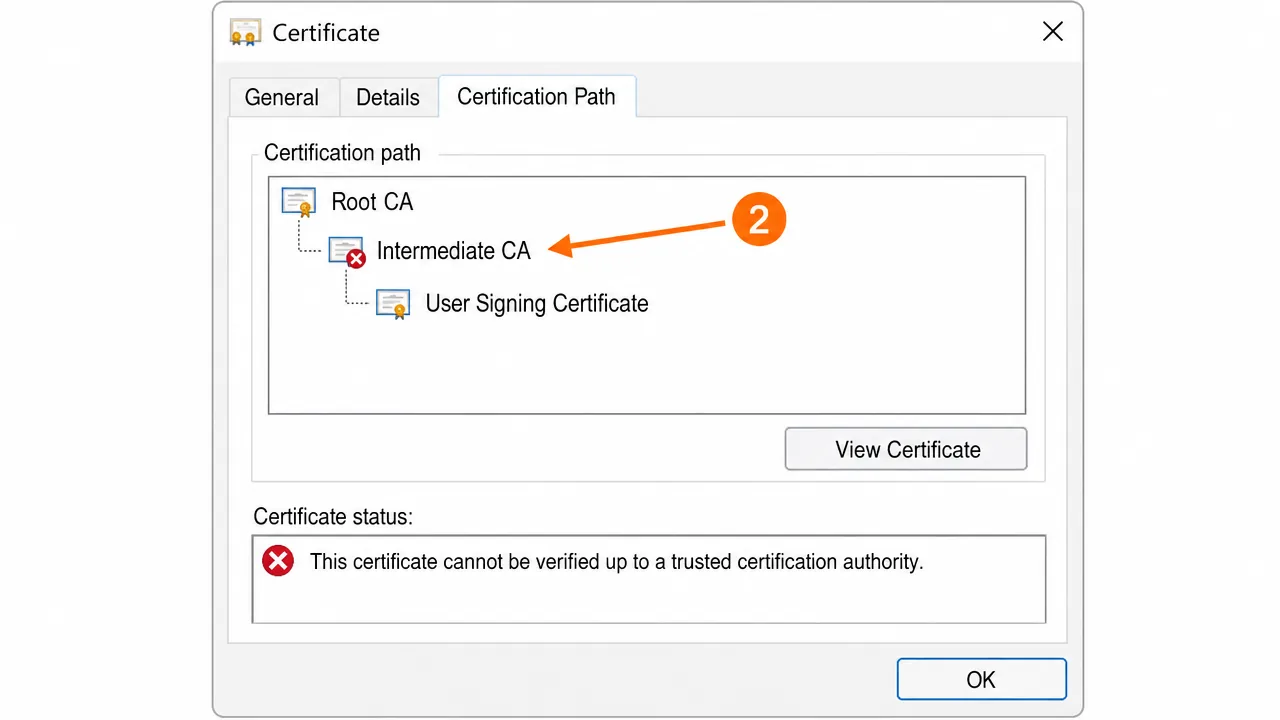
Most PKI failures in Canada trace to four things: a missing intermediate certificate, a root in the wrong store, a revocation check that can't reach its responder, or a key store the application doesn't actually read. Diagnose by reading the certification path first, then verifying revocation reachability and the correct key store.
A systems administrator at a logistics company in Ontario reached out after a week of chasing a certificate problem in circles. Their internal portal signed shipping documents fine for most staff, but for a handful of users on a newer Windows build, every signature came back untrusted. They'd reissued certificates, rebuilt profiles, and even reimaged one laptop. Nothing stuck. The pattern made no sense until we stopped looking at the certificate and started looking at the path around it.
That's the core lesson of PKI troubleshooting: the certificate is almost never the thing that's broken. What breaks is the infrastructure of trust around it — the chain, the revocation checks, and the key stores different applications quietly rely on. An expert doesn't reinstall and hope. They isolate which of those layers actually failed.
How PKI trust actually works
A certificate is only trusted when software can build an unbroken path from it up to a root the machine already believes in, and then confirm none of the links along the way have been revoked. Two separate questions have to both answer "yes": can I build the chain, and is every link still valid right now.
Most people only think about the first question. They install the certificate, see a chain, and assume they're done. But the second question — revocation — fails just as often and looks completely different. A firewall that blocks an OCSP request will make a flawless certificate appear untrustworthy, and the error message won't mention the network at all.
Honestly, the vague error text is half the battle. "Cannot be verified" could mean a missing intermediate, a wrong store, a dead responder, or the wrong key store entirely. Guessing wastes days. Reading the certificate does not.
Basic checks before you go deeper
Diagnosis beats reinstallation. Start by gathering facts.
-
Read the Certification Path tab. Double-click the certificate, open "Certification Path," and read it top to bottom. A red mark on any node is your break point. This one screen eliminates most guesswork.
-
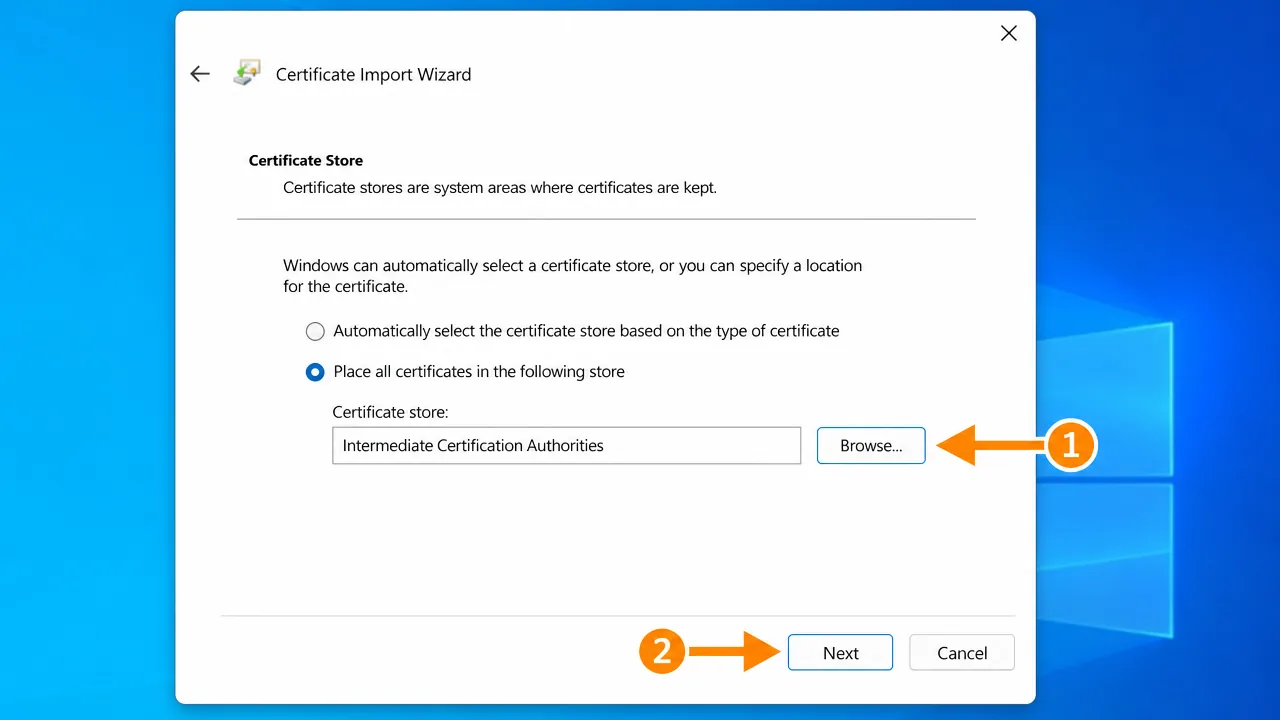
Confirm store placement. The root belongs in "Trusted Root Certification Authorities," intermediates in "Intermediate Certification Authorities." A root in the wrong store is functionally no root at all.
-
Check revocation reachability. Note the OCSP and CRL URLs in the certificate's Details tab, then confirm the machine can actually reach them. A blocked endpoint is invisible until you test it directly.
-
Identify which key store the failing app uses. Windows apps use the system store; Java uses cacerts; some tools use their own. Knowing this before you touch anything saves you fixing the wrong store.
Step-by-step troubleshooting
Once you've read the situation, act on the specific break.
-
Rebuild the chain for the exact issuing CA. Match the "Issued by" field precisely and install that CA's root and intermediates. A near-match from a differently named authority changes nothing.
-
Install intermediates deliberately. Place each intermediate in the intermediate store. Where people get stuck: assuming one intermediate when the CA actually uses two.
-
Flush the chain cache. Run
certutil -urlcache * deleteelevated. Windows caches both path-building and revocation results, so a stale cache keeps failing after a correct fix. -
Test revocation explicitly. Use
certutil -verify -urlfetchagainst the certificate. This forces a live OCSP and CRL check and tells you exactly whether the responder is reachable — the check most people skip. -
Handle blocked responders. If a firewall blocks OCSP or CRL, either allow the endpoint or, for a controlled internal environment, configure the app's revocation policy appropriately. Don't silently disable revocation on anything internet-facing.
-
Import into the correct key store. For Java tools, import the root into cacerts with keytool. Where people get stuck: fixing the Windows store repeatedly while the Java app never reads it.
-
Verify in the failing application, not just certmgr. A chain that looks perfect in Windows can still fail in an app with its own trust list. Always confirm where the certificate is actually consumed.
A case where the obvious fix didn't work
Back to that logistics company. The certificate was valid, the chain built cleanly, the stores were correct. Reissuing did nothing because nothing was wrong with the certificate. The users who failed were all on a network segment where a newly tightened firewall rule blocked outbound OCSP traffic.
Their machines could build the chain but couldn't confirm the certificate hadn't been revoked, and the application was configured to fail hard when it couldn't check. The valid certificate looked untrustworthy purely because the machine couldn't ask the question. Allowing the OCSP endpoint fixed every affected user at once. No certificate work required — it was a network rule the whole time.
An edge case people miss
Cross-platform environments are where PKI troubleshooting gets genuinely tricky. A certificate can be perfectly trusted in Windows, validate in a browser, and still fail inside a Java-based tool or a Linux service, because each maintains its own trust store. Canadian organizations running mixed Windows, macOS, and Java stacks hit this constantly. The fix isn't more work in the Windows store — it's importing the same root into every trust store that matters, one platform at a time.
Diagnosis mindset: read before you rebuild
The habit that separates quick fixes from week-long ordeals is refusing to reinstall anything until you've read what the machine is actually reporting. Every reinstall is a guess, and guesses in PKI are expensive because the symptoms all look the same. A missing intermediate, a blocked responder, and a wrong key store all surface as "not trusted," so the only way forward is to make the machine tell you which one it is.
That's why the certification path tab and certutil -verify -urlfetch are worth more than any reinstall. One shows you the chain and where it breaks; the other forces a live revocation check and reveals whether the responder is even reachable. Between those two, you can usually name the exact failure in a couple of minutes. Honestly, most of the drawn-out PKI nightmares I've seen were caused by someone skipping this and reinstalling in a loop, changing nothing because they never found what was broken.
Why cross-platform environments make this harder in Canada
Canadian organizations frequently run genuinely mixed estates — Windows desktops, macOS laptops, Linux servers, Java-based enterprise tools, all touching the same certificates. Each of those keeps its own idea of what to trust. Windows has its store, macOS has Keychain, Java has cacerts, and various services have bespoke trust configurations. A certificate that's flawless in one is invisible in another, and the error each throws is identically unhelpful.
The result is a class of problem that feels contradictory: "it works for finance but not for the warehouse system," "it validates in the browser but fails in the batch job." That's not one broken certificate — it's several trust stores that were never brought into agreement. The fix is unglamorous but reliable: identify every trust store that has to trust the certificate, and import the same root into each, verifying in the actual application each time rather than assuming the Windows fix carried across. Bilingual and multi-site setups add another wrinkle, because trust changes made on one site's image often never propagate to the other's.
If none of this works
If the chain builds, revocation is reachable, the stores are correct on every platform, and validation still fails, you're likely into subtler territory — a policy OID mismatch, a cross-signed certificate confusing path building, a name-constraints issue, or clock skew affecting validity windows. Those take careful, evidence-based diagnosis rather than another reinstall, and they're exactly the kind of problem handled professionally. No guarantees, no shortcuts — just working the layers methodically until the real failure reveals itself.
Expected result when it's fixed
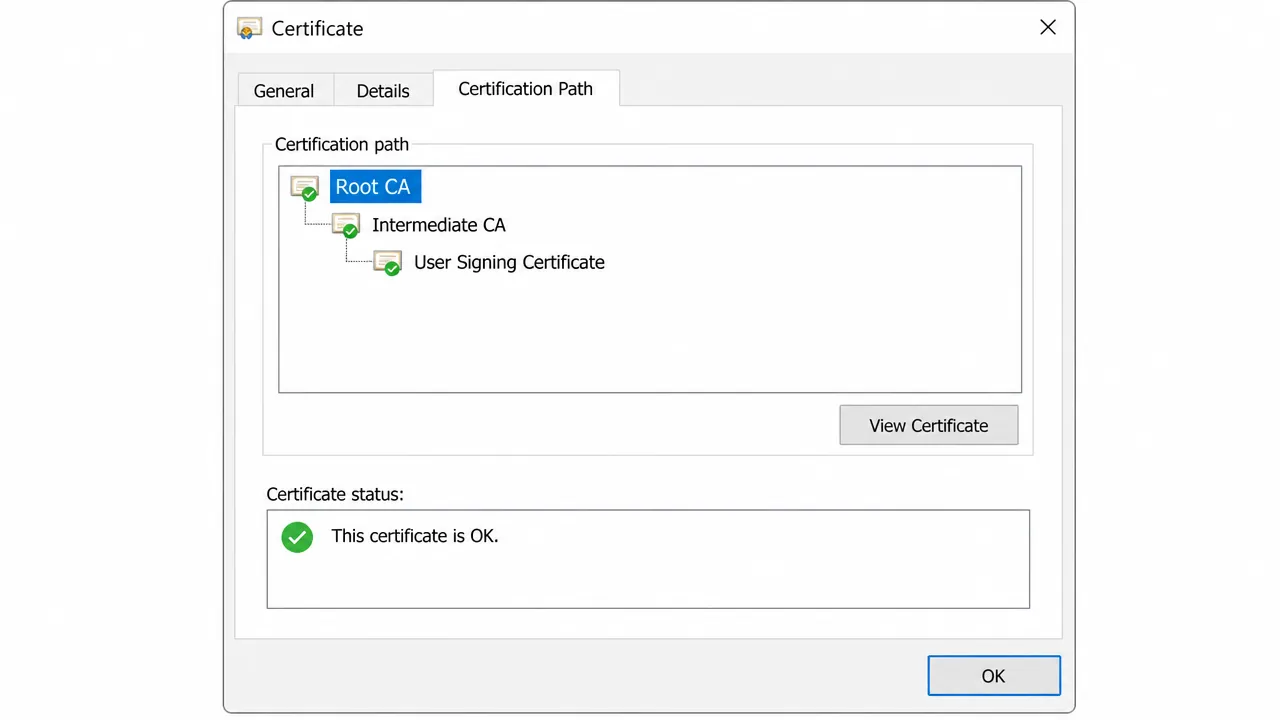
With every intermediate installed, revocation reachable, and the right store in place, the certification path resolves end to end. The status should read that the certificate is OK, with no warning icons anywhere in the chain.
Frequently asked questions
What are the most common PKI failures?
A missing intermediate certificate, a root installed in the wrong store, a revocation check that can't reach its OCSP or CRL endpoint, and applications reading a key store you didn't update. Those four cover the large majority of real-world cases.
Why does a certificate work on one machine but not another?
Trust is per-machine. One computer has the full chain and current revocation data; the other is missing an intermediate or can't reach the revocation responder. The certificate is identical — the environment around it isn't.
What is a revocation check and why does it fail?
Before trusting a certificate, software checks whether the issuer has revoked it, via OCSP or a CRL. If a firewall blocks that request or the responder is down, validation can fail 'soft' or 'hard' depending on the app's policy, even for a perfectly valid certificate.
Why does my certificate work in Windows but fail in a Java application?
Java uses its own cacerts keystore and ignores the Windows certificate store entirely. You have to import the CA root into the Java keystore separately for Java-based tools to trust the chain.
Need hands-on help?
Get expert, independent help with PKI, certificates and digital signatures over a screen-shared remote session.
Comments
Loading comments…